
Localizing your app is one of the highest-ROI investments in international growth, but done poorly, it can undermine your product’s credibility in every market it touches. This guide covers everything, from string files to cultural adaptation to App Store optimization.
There are roughly 5.6 million apps on the App Store and Google Play combined. The ones that dominate international markets share one quality: they feel native. Not translated, native. The text fits the layout. The currency is correct. The dates make sense. The tone feels like a local product, not a foreign one with a translation layer bolted on.
That is what mobile app localization is actually about. Not just converting strings from English to German or Japanese, but building an experience that users in each market trust as their own. This guide explains how to do that.
App translation vs. app localization: what’s the difference?
These terms are often used interchangeably, but they describe meaningfully different scopes of work.
App translation means converting text strings from the source language into one or more target languages. The words change; everything else stays the same.
App localization is the full adaptation of the app for a specific locale. It includes translation, but also:
- Adapting UI layouts to accommodate text expansion or contraction (German expands 20–30% from English; Chinese contracts significantly)
- Adjusting date, time, and number formats (the US uses MM/DD/YYYY; Germany uses DD.MM.YYYY; Japan uses YYYY年MM月DD日)
- Adapting currency symbols, decimal separators, and thousands separators
- Replacing culturally specific images, icons, or colour associations
- Adapting content for local legal requirements (e.g. GDPR for EU users, different age rating systems)
- Localizing App Store and Google Play metadata: app name, description, keywords, screenshots
You can translate an app and still have a product that feels obviously foreign to native speakers. True localization closes that gap.
The technical side: iOS vs. Android string files
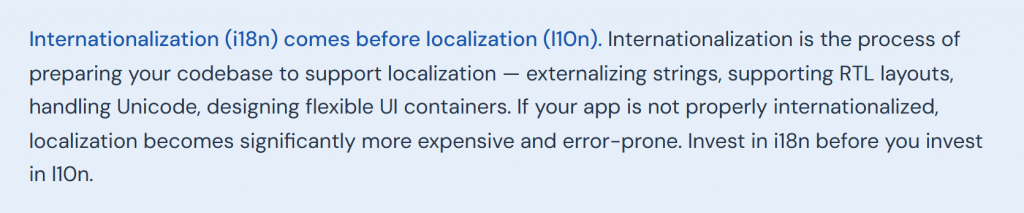
The mechanics of localization differ between platforms, and understanding the file formats involved helps you plan your workflow and avoid common technical errors.
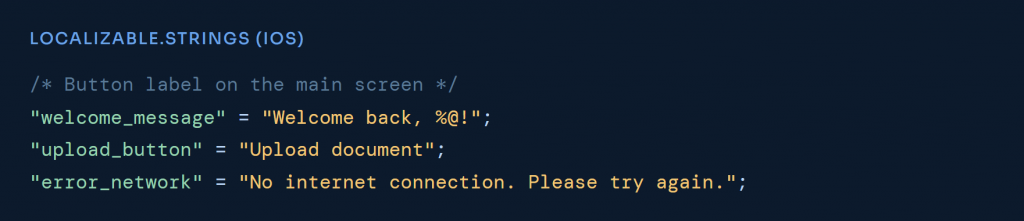
iOS: .strings and .stringsdict
iOS uses .strings files for simple key-value string pairs, stored in Localizable.strings. For plural rules — which vary significantly across languages — iOS uses .stringsdict files, which support the plural categories defined by Unicode CLDR (zero, one, two, few, many, other).
A critical detail: always include comments (the /* … */ lines above) for every string. These give translators the context they need to choose the right word — the same English word can have multiple correct translations depending on its purpose.
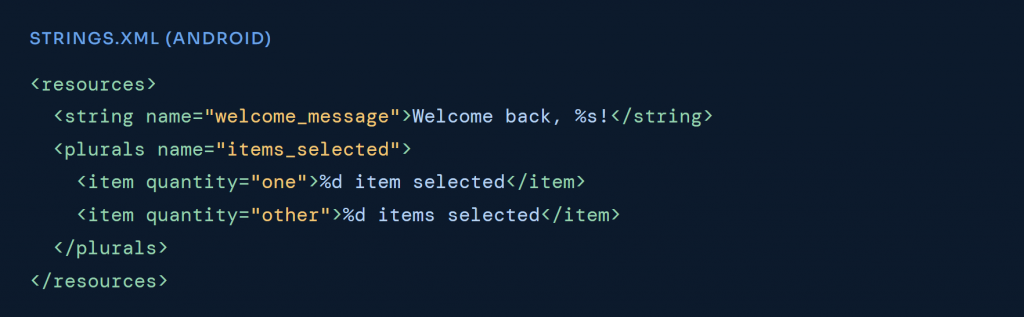
Android: strings.xml
Android stores strings in res/values/strings.xml, with localized versions in subdirectories like res/values-de/strings.xml for German. Android natively supports plural strings via the <plurals> element, with quantity attributes aligned to CLDR plural categories.

What actually needs to be localized in your app
A common mistake is treating localization as a purely text problem. Here is a more complete picture of every layer that may need adaptation:
| Layer | What changes | Often missed? |
| UI strings | All visible text, buttons, labels, error messages, tooltips, onboarding | No |
| Plurals & gender | Grammatical variations that vary by language | Yes |
| Date & time formats | DD.MM.YYYY vs MM/DD/YYYY; 24h vs 12h clock | Yes |
| Number & currency | 1.000,00 (DE) vs 1,000.00 (US); currency symbol placement | Yes |
| App Store metadata | App name, description, keywords, screenshots, preview videos | Often |
| Push notifications | All notification copy must be translated | Yes |
| Email templates | Transactional and marketing emails sent by the app | Yes |
| Images & icons | Culture-specific imagery, hand gestures, colour symbolism | Yes |
| Legal text | Privacy policy, terms of service, cookie consent (especially for EU) | No |
| Customer support | In-app help content, FAQ, chat response templates | Yes |
Cultural adaptation: where localization goes beyond words
Language is only part of the picture. Users notice (and disengage from) apps that feel culturally misaligned, even when the translation is technically accurate.
Some common areas where cultural adaptation matters:
- Colour symbolism. Red signals danger or error in Western contexts, but luck and prosperity in China. Green can mean different things across cultures. If your UI relies on colour coding, consider regional associations.
- Hand gestures and body language icons. The thumbs-up icon is positive in Western markets but potentially offensive in some Middle Eastern contexts. The OK hand gesture has different meanings in different regions.
- Formality levels. German has a formal/informal distinction (Sie vs. du) that matters significantly in business contexts. Japanese has multiple politeness registers. Getting this wrong makes your app feel either too casual or bizarrely formal.
- Reading direction. Arabic and Hebrew are right-to-left. A proper RTL implementation mirrors the entire UI layout, not just the text direction. This requires CSS/Swift/Kotlin-level changes, not just a translation.
- Local payment methods. If your app involves payments, users in Germany heavily use SEPA bank transfers, while Dutch users favour iDEAL. In China, Alipay and WeChat Pay dominate. Showing only credit card fields is a conversion-killer in many markets.
App Store and Google Play localization
App Store Optimization (ASO) in each target language is often more valuable than the in-app localization itself. Users discover your app through store listings. If your listing isn’t localized, they may never get to the app at all.
What to localize for ASO:
- App name: Consider whether a translated or adapted name performs better than the English original in each market. Some brands localize the name; others keep it consistent for brand recognition.
- Subtitle / short description: This appears in search results and should contain your most important keywords in the target language.
- Full description: Rewrite (not translate) for each market, incorporating locally searched terms.
- Keywords field (App Store only): Research local search behaviour; the keywords users type in Germany are different from the US even when they share a concept.
- Screenshots and preview videos: Localize the UI shown, the device language, and any overlaid text. Screenshots with localized UI perform measurably better than screenshots in English.

Building a localization workflow that scales
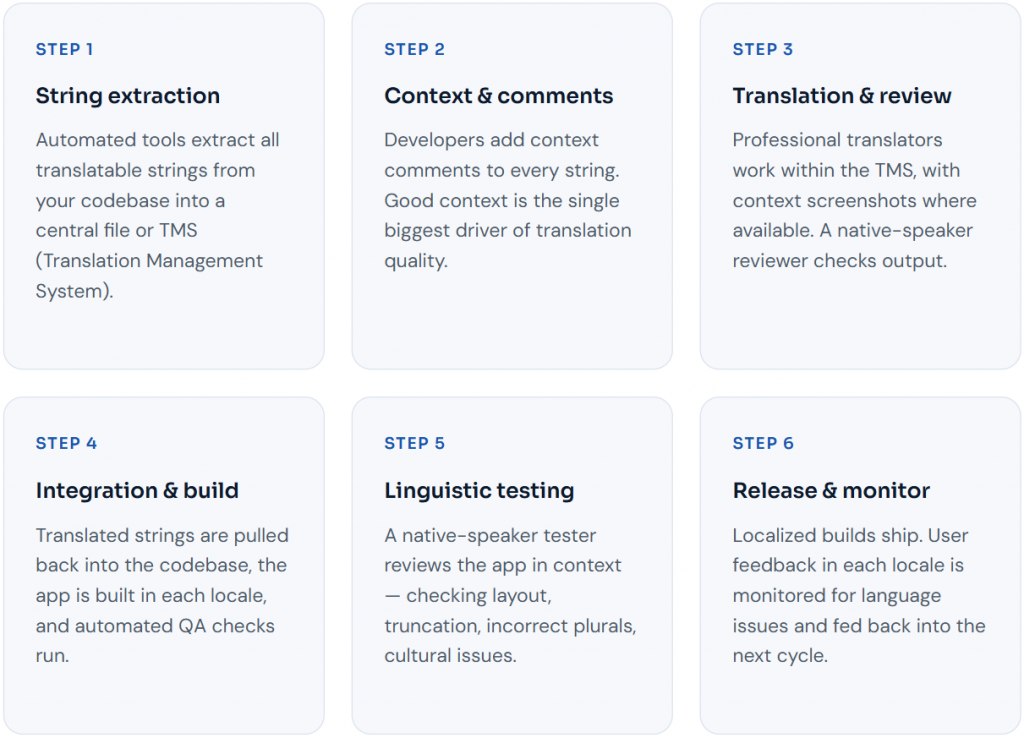
For a one-time localization into one or two languages, a simple translate-and-integrate approach works. But if you are shipping continuous updates across multiple languages, you need a scalable workflow, otherwise localization becomes the bottleneck that slows every release.
Localization testing: the step most teams skip
Submitting translated strings and calling it done is where most localization efforts break down. Testing is non-negotiable. Here is why:
- Text expansion. German text is typically 20–30% longer than English. Buttons that say “Submit” in English become “Einreichen” in German, wider, potentially wrapping, potentially truncating with an ellipsis mid-word if your layout doesn’t flex.
- Truncation. App UIs clip long strings. A translated label that is grammatically correct may display as “Eing…” in your UI, which is meaningless.
- Concatenation bugs. Code that builds strings by concatenating fragments (“You have ” + count + ” messages”) will produce grammatically wrong strings in most languages, because word order and gender agreement differ. Translators need the full string in context to produce correct output.
- RTL layout issues. Right-to-left languages require mirrored UI logic. Even apps that use platform-native RTL support often have edge cases, icons that shouldn’t mirror but do, or text that wraps incorrectly.
- Placeholder mismatches. If a string contains %@ or %1$s placeholders, they must survive translation intact. A translator who accidentally drops a placeholder will produce a runtime crash.
Always have a native speaker test the app in-context, not just the translation file in isolation. This is what professional localization QA means, and it is not something automated tools can fully replace.
Which languages to localize into first
You don’t need to localize into 20 languages on day one. A smarter approach is to prioritize based on your existing user data, market opportunity, and competition.
As a starting framework, the highest-value languages for most apps beyond English are:
- Spanish: 500M+ speakers, dominant across LATAM and Spain, high app download volumes
- German: Germany is the largest app market in Europe; German users spend significantly more per app than average
- French: France, Belgium, Switzerland, Quebec, and large parts of Africa
- Japanese: Among the highest per-user app spend globally; Japanese users are also among the most likely to abandon apps not in their language
- Korean: South Korea has a very high smartphone penetration and competitive but lucrative app market
- Brazilian Portuguese: Brazil is one of the largest app markets globally by download volume
- Chinese Simplified: China is the world’s largest app market by downloads; requires specific compliance and distribution strategy
- Arabic: requires full RTL implementation; Gulf markets have high per-user purchasing power
Your analytics will tell you more precisely. If you already have organic users in Germany who found the app despite it being in English only, that is a strong signal of demand worth capturing.
Frequently asked questions
- How long does it take to localize a mobile app?
Timeline depends on the volume of strings, the number of target languages, whether localization testing is included, and your team’s review bandwidth. A small app (3,000–5,000 words) into one language can be translated and reviewed within 3–5 business days. A full localization project covering 8 languages with testing typically takes 3–6 weeks. Continuous localization of new strings in an agile workflow is typically faster because only new/changed strings need to be translated each cycle.
- Should I use a localization platform or a translation agency?
Localization platforms (Awtomated, Lokalise, Phrase, Smartling) are excellent for managing the workflow — automating string extraction, tracking changes, and integrating with your CI/CD pipeline. Translation agencies provide human linguistic expertise. The best setups use both: a platform to manage the process and professional native-speaker translators (either through the platform’s marketplace or via an agency like Linguidoor) to handle the actual translation. Pure automated translation through a platform without human review is adequate for low-stakes content but not for UI copy that users will interact with every day.
- Can I use machine translation (DeepL, Google Translate) for app localization?
Machine translation can be a useful first pass, it gives translators a starting point to edit rather than translate from scratch, which reduces cost and time. But for UI strings, which are short and context-dependent, machine translation without human post-editing produces unreliable results. Short strings lose context entirely when machine-translated in isolation (the word “Cancel” could mean cancel a booking, dismiss a dialog, or cancel a subscription, a machine translator won’t know which). At minimum, all machine-translated app strings should be reviewed by a native-speaker editor before shipping.
- What is pseudo-localization and should I use it?
Pseudo-localization is a technique that replaces app strings with modified versions that simulate the characteristics of translated text (expanded length, accented characters, RTL direction) without actual translation. It is a development-stage QA tool for catching layout issues before you invest in real translation. Any app that will be localized should run pseudo-localization testing first. It catches truncation, hardcoded layout widths, concatenation problems, and missing string externalization that would otherwise be discovered only after you have paid for real translations.