
You’ve done the hard work: hired linguists, adapted your content, configured local payment methods, and rebuilt your checkout flow for a new market. The localized version is sitting in staging and launch day is approaching.
This is the moment most teams rush. It’s also the moment that determines whether the investment pays off or produces an expensive public failure.
Localization testing (also called LQA, or localization quality assurance) is the structured process of verifying that your localized site works correctly, reads naturally, behaves as expected, and complies with local standards before any real user sees it. It’s the final gate between everything that went into the localization process and the market you’ve invested in reaching. Skipping it doesn’t save time, it moves problems from pre-launch to post-launch, where fixing them costs 10–100x more. A bug caught in staging is a 30-minute fix. The same bug discovered by customers triggers support tickets, refund requests, and (in markets like Germany) potential regulatory complaints.
1. Why Localization Testing Is Not the Same as Standard QA
Standard website QA checks that your site works. Localization QA checks that your site works for a specific market, which is a fundamentally different and significantly more complex task.
A standard QA pass will not catch a translated button label that’s grammatically correct but 40% longer than expected and now overlaps with an adjacent element. It won’t flag an image of a thumbs-up gesture that reads as offensive in parts of the Middle East. It won’t notice that a cookie consent banner doesn’t meet GDPR requirements, that the checkout form rejects valid UK postcodes, or that hreflang tags are syntactically correct but pointing at the wrong locale.
These failures are invisible to a general QA engineer. They require reviewers with specific market knowledge, specific technical awareness of how localization is implemented at the code level, and a testing framework designed specifically for localization.
| Translation and localization errors have different failure modes. Only specific types of tester find each. You need both. |
2. The Four Types of Localization Testing
Professional LQA programs divide testing into four distinct types, each requiring different reviewers, different tools, and different expertise. The four types are not interchangeable, skipping any one creates a specific category of failure the others won’t catch.
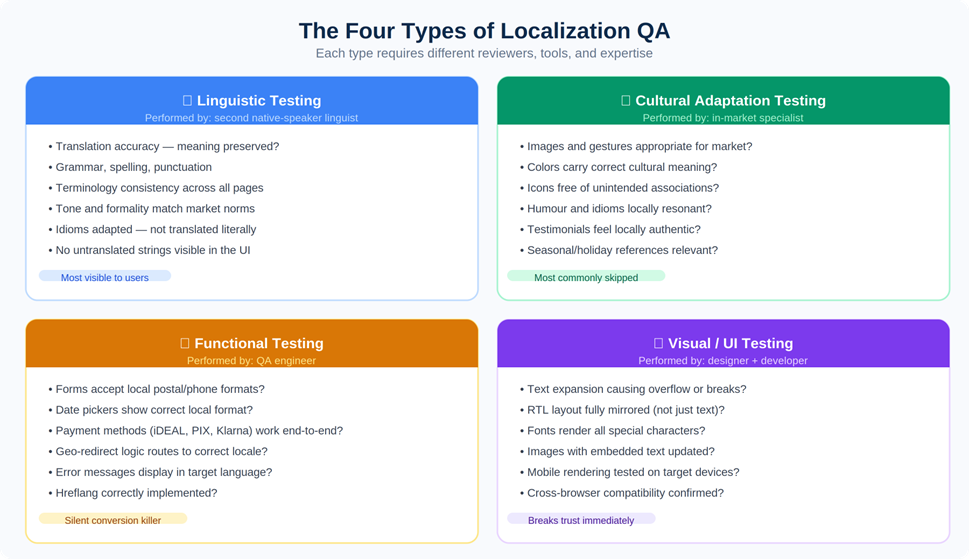
Figure 1: The four QA types and what each catches. Cultural testing is the most commonly skipped — and the most likely to cause market-entry failures.
Linguistic Testing
Linguistic testing verifies the quality and accuracy of the translated content itself. This is not a creative preference review, it’s a systematic check against specific criteria: translation accuracy, grammar and spelling, terminology consistency, tone and formality, and untranslated strings still showing through in the UI.
The formality point deserves specific attention. In German B2B contexts, addressing a prospect as du (the informal pronoun) when Sie (the formal) is expected reads as culturally tone-deaf before the buyer has evaluated a single feature. The full picture of what German-market localization demands around tone and formality goes well beyond grammar, but linguistic testing is where this category of error gets caught.
Critically: linguistic testing must be performed by a native speaker who did not do the original translation. Translators are too familiar with their own work to reliably catch their own errors. This is not a cost-cutting option, it’s the minimum viable process.
Cultural Adaptation Testing
Cultural testing verifies that the adapted content is appropriate and resonant for the target market, not just linguistically accurate. It’s the category most frequently skipped in rushed launches, and the one most likely to produce the kind of visible mistake that goes viral for the wrong reasons.
• Images and gestures: A thumbs-up is positive in most Western markets and a rude gesture in parts of the Middle East and West Africa. Stock photography that reads as natural in the US can feel culturally alien in Japan or inappropriate in more conservative Gulf markets.
• Colour associations: White is a mourning colour in much of East Asia. Green carries specific religious significance in Islamic contexts. These associations vary enough between markets that any colour used prominently in brand communications should be explicitly reviewed.
• Social proof: Customer names, testimonial companies, and case study logos should feel locally authentic. A German B2B prospect is more reassured by a recognisable German brand than by an American enterprise name they’ve never encountered.
Cultural testing requires genuine in-market experience, not just language fluency. This is one of the areas where choosing the right localization partner has the most direct practical impact on outcomes.
Functional Testing
Functional testing is where localization projects most commonly suffer silent failures, issues that look fine visually but break when a real user actually tries to complete a task:
• Form validation: Does the address form accept valid local inputs? UK postcodes contain letters. Dutch postcodes are four digits followed by two letters. A form built around US ZIP code validation rejects perfectly valid entries from most of the world.
• Payment methods: Displaying iDEAL, Klarna, or Boleto in the checkout is not enough. Each must be tested end-to-end through to order confirmation. Payment method integrations are among the most common sources of staging-to-production failures. The full picture of payment method requirements by market is more complex than it appears.
• Date and currency formatting: The decimal separator is a comma in Germany, France, and most of continental Europe. It’s a period in the UK and US. A price rendered as “€1.234,99” reads correctly to a German user and looks like a typographical error to a British one.
• Hreflang: Correct hreflang is what tells search engines which version of your site to serve in which market. Errors here produce no visible page-level failures, they produce invisible SEO failures, routing the wrong content to the wrong audiences and undermining the international search visibility that localization is supposed to build.
Visual and UI Testing
Visual testing catches the interface failures that become obvious the moment a user lands on the page:
• Text expansion: German and Finnish text routinely runs 30–40% longer than English. Every button, tab label, and navigation item needs to be checked with the actual translated string in place, not the English placeholder.
• RTL layout: For Arabic, Hebrew, and Persian, the requirement is not to right-align the text — it’s to mirror the entire interface. Navigation belongs on the right, content flows right-to-left, and directional icons need to reverse. The technical requirements of Arabic localization make RTL a category of its own, distinct from everything else in this checklist.
• Font rendering: Fonts that handle Latin characters flawlessly often have incomplete Cyrillic, Arabic, or CJK glyph coverage. Missing glyphs render as empty boxes.
• Mobile: In many of the markets where international expansion delivers the highest returns (Southeast Asia, Latin America, Sub-Saharan Africa) the majority of internet users are mobile-first. Test on real devices used in the target market.
3. Building Your Localization QA Workflow
The four testing types need to run in a specific sequence. Trying to run all of them simultaneously creates version-control chaos and means issues found in later rounds invalidate work signed off in earlier ones.
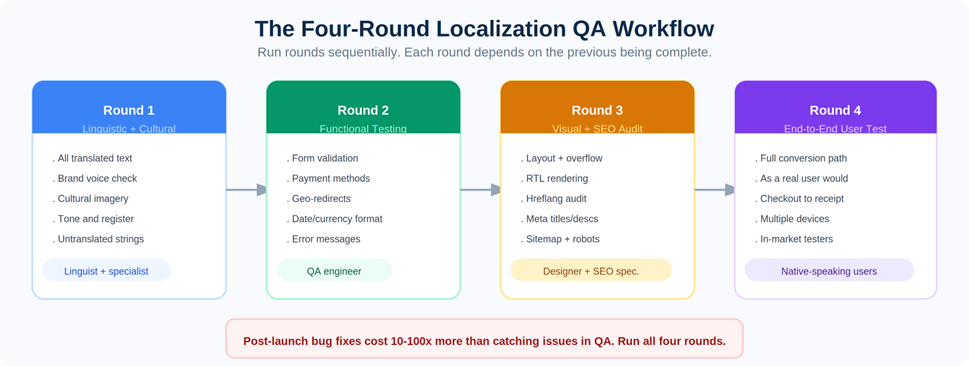
Figure 2: Run the four rounds sequentially. Each depends on the previous being signed off before it starts.
Step 1: Set Up Your Staging Environment Properly
Reviewers must test the actual localized site in a staging environment, not review content in a spreadsheet, a Google Doc, or a translation tool interface. Context is everything. A string that looks correct in a translation file can still break the UI when it renders inside an actual page template, particularly for RTL languages and languages with significant text expansion.
The staging environment should mirror production as closely as possible: same CDN configuration, same currency logic, same payment gateway integrations running in sandbox mode, same geo-redirect behaviour.
Step 2: Create a Testing Matrix
Before testing begins, map out every page, feature, and interactive element that needs to be checked for each locale. Don’t rely on informal lists. The matrix should cover every localized URL, all interactive elements per page, locale-specific features like payment methods and currency display, SEO elements including hreflang and meta content, and legal elements including cookie consent and pricing display requirements.
The matrix also serves as your sign-off document. Each row gets a pass/fail status and a responsible reviewer. Nothing launches until every row has a confirmed pass.
Step 3: Assign Testing Roles Explicitly
Localization QA requires expertise that no single person possesses. Assign roles clearly before testing begins:
| Testing Type | Who Performs It |
| Linguistic review | Native speaker, different from the original translator |
| Cultural review | In-market specialist or native-speaker consultant |
| Functional testing | QA engineer familiar with localization edge cases |
| Visual / UI review | Designer or front-end developer |
| SEO audit | SEO specialist with international SEO experience |
| Legal compliance review | Legal counsel or compliance specialist for target market |
The most critical assignment: the linguistic reviewer must be a different person from the original translator. Familiarity with their own work creates blind spots that an independent reviewer catches within minutes. If you’re evaluating localization service providers, a two-linguist review model should be a baseline requirement, not a premium add-on.
Step 4: Run Four Sequential Rounds
Run testing in four distinct rounds, moving to the next only when the current one is signed off:
1. Linguistic and cultural review. Linguists and in-market specialists go through all translated content in the staging environment. Issues are logged, corrected, and re-checked before moving forward.
2. Functional testing. QA engineers test all interactive elements: form validation, payment flows, date pickers, geo-redirects, email triggers, and error states.
3. Visual and SEO audit. Designers check for layout breaks, text overflow, and RTL rendering. SEO specialists audit hreflang, meta content, URL structure, sitemap, and robots.txt.
4. End-to-end user testing. Native-speaking users in the target market walk through the entire site as real customers would, across multiple devices, completing full conversion flows including checkout, confirmation screen, and follow-up email. This round regularly catches issues that specialist reviewers, too close to the detail, have become blind to.
4. Pre-Launch Localization QA Checklist
Use this as your sign-off template. Every item needs a confirmed pass before launch is approved.
Linguistic
| ☐ | All text accurately reflects source meaning |
| ☐ | Grammar, punctuation, and spelling are error-free |
| ☐ | Terminology is consistent throughout the site |
| ☐ | Tone and formality match target market conventions |
| ☐ | No untranslated strings visible anywhere in the UI |
| ☐ | Idioms and marketing copy are culturally adapted, not literally translated |
| ☐ | Product names, brand terms, and proper nouns follow the style guide |
| ☐ | Placeholder or truncated text from the CMS has been resolved |
Cultural
| ☐ | All images are appropriate for the target culture |
| ☐ | Colours and visual design elements have been culturally reviewed |
| ☐ | Icons carry no unintended meaning in the target market |
| ☐ | Social proof (names, testimonials, logos) feels locally authentic |
| ☐ | Humour, colloquialisms, and cultural references have been adapted |
| ☐ | Holiday and seasonal references are relevant to the target market |
Functional
| ☐ | All forms accept local input formats (postal codes, phone numbers, name order) |
| ☐ | Date pickers display in correct local format; week starts on correct day |
| ☐ | Currency correctly converted and formatted with correct decimal and thousands separators |
| ☐ | All localized payment methods function correctly end-to-end |
| ☐ | All internal links route to the correct localized page |
| ☐ | Geo-redirect logic routes correctly and locale preference persists across sessions |
| ☐ | Error messages appear in the correct language |
| ☐ | Checkout flow completes successfully in the localized version |
| ☐ | Confirmation emails and autoresponders trigger in the correct language |
| ☐ | Hreflang tags correctly implemented and cross-referencing all locale versions |
Visual / UI
| ☐ | No text overflow or layout breaks due to text expansion or contraction |
| ☐ | RTL layout is fully mirrored, not just text direction |
| ☐ | Fonts render all required special characters correctly |
| ☐ | Images with embedded text have been updated with localized versions |
| ☐ | Mobile layout renders correctly on devices common in the target market |
| ☐ | Site renders correctly on major browsers used in the target market |
SEO
| ☐ | Hreflang tags correctly implemented and bidirectional across all locale versions |
| ☐ | Canonical tags correctly configured for each locale |
| ☐ | Meta titles and descriptions are localized for local search intent, not just translated |
| ☐ | URL structure correctly set up (/de/, subdomains, or ccTLD) |
| ☐ | XML sitemap includes all localized URLs |
| ☐ | Robots.txt is not blocking any localized pages |
| ☐ | Structured data updated and validated for the locale |
Legal / Compliance
| ☐ | Cookie consent banner compliant with local regulations (GDPR, LGPD, PIPL, etc.) |
| ☐ | Privacy policy reflects local data protection law, not a translated English document |
| ☐ | Terms of service are legally appropriate for the target market |
| ☐ | Pricing includes required taxes and fees per local consumer law |
| ☐ | Regulated elements (age verification, withdrawal notice, warranty) are compliant |
5. The Mistakes That Most Often Slip Through
Even teams following a structured process consistently make the same categories of error. These are the ones worth treating as explicit checkpoints:
Testing in a spreadsheet rather than the live environment
Context is everything in localization QA. A translated string that looks correct in a translation file can break a UI component the moment it renders inside an actual page template. Text expansion, font rendering, and RTL layout failures are all invisible outside the browser. Always test in-context, in the staging environment, on real devices.
Using the original translator as the sole reviewer
Translators are too familiar with their own work to catch all their own errors. This applies universally, it’s a cognitive limitation, not a quality failure. A second independent native-speaker reviewer catches errors the original translator will consistently overlook. This single change accounts for a large proportion of quality improvements in professional localization programs.
Testing pages but not the conversion path
Most QA processes check individual pages. What they miss is the sequence, the path a user follows from landing page through to order confirmation and post-purchase email. Silent failures cluster at transition points: between checkout steps, between the payment gateway and the confirmation screen, in the triggered email receipts. These are among the most common localization mistakes precisely because they’re the hardest to catch without end-to-end testing.
| A completed checkout that triggers a confirmation email in the wrong language is a functional failure, even if every individual page passed its visual review. |
Skipping mobile testing
In many of the markets where international expansion delivers the highest commercial returns (Southeast Asia, Latin America, large parts of Sub-Saharan Africa) the majority of internet users access the web on mobile. A localization that works perfectly on desktop and breaks on a mid-range Android device is a failed localization for those markets. Test on real devices used in the target market, not only desktop browsers in the testing team’s office.
Treating LQA as a one-time launch event
Every content update, feature release, and campaign following launch creates new localization surface area. A new product page published in English without a corresponding update to the German or Japanese version breaks the consistency of the experience. This is especially relevant for SaaS companies running continuous localization workflows, where development and content move fast enough that the localization layer can fall behind within weeks if there’s no automated sync in place.
6. Tools Commonly Used for Localization Testing
No single tool covers all four testing types. A functioning LQA setup combines tools from multiple categories:
For linguistic and in-context review
• Crowdin — in-context review mode so translators and reviewers see content rendering live in the actual UI, not in an isolated file
• Lokalise — side-by-side translation with screenshot capture for visual context on each string
• Phrase — automated QA quality checks integrated directly into the translation workflow
For functional and visual testing
• BrowserStack — real device testing across browsers, operating systems, and geographic locations
• LambdaTest — cloud-based testing with geo-location simulation across hundreds of device and browser combinations
• Screaming Frog — crawl-based hreflang audit; flags missing, mismatched, and broken cross-references across all locale versions
For SEO audit
• Google Search Console — monitor indexing, coverage, and keyword performance segmented by country after launch
• Semrush / Ahrefs — international keyword rank tracking per market, hreflang issue detection, and crawl-based coverage analysis
For cultural review
• In-market freelance consultants — the highest-value input for cultural testing; no tool replaces someone who actually lives in the target market
• UserTesting — remote user testing panels segmented by country and language for end-to-end testing with real-market audiences
7. Frequently Asked Questions
How long does localization testing typically take?
A focused QA pass on a 20–30 page website for a single locale typically takes 3–7 business days across all four rounds. Complex sites with e-commerce checkouts, multiple interactive flows, or many locale variants take proportionally longer. Build the testing timeline into your project plan from the start, it’s the stage most commonly compressed when other stages run late.
Does every language need to be tested separately?
Yes, always. Each language produces different text lengths, character sets, font requirements, and potential UI problems. German text expansion creates completely different layout failures from Japanese text contraction. RTL Arabic creates failures that don’t exist in any LTR language. Testing one version does not validate any other.
What is pseudolocalization, and should I use it?
Pseudolocalization is a developer technique where extended placeholder characters are inserted before real translation begins, to simulate text expansion and special character requirements. It’s an excellent early-warning system for layout breaks and font coverage gaps, catching them before translation work starts, when they’re cheapest to fix. If your development team didn’t run pseudolocalization, treat Visual/UI testing as especially high priority.
How do we handle legal compliance testing without in-house legal counsel?
For EU markets, GDPR compliance is the minimum bar. Work with a data protection specialist or a localization partner with compliance experience. For markets with specific legal obligations (Germany’s Impressum requirement, Japan’s Act on Specified Commercial Transactions disclosure, Brazil’s LGPD) local legal review is not optional. The cost of a legal review is a fraction of the cost of a regulatory penalty.
Can parts of localization testing be automated?
Automated crawls can flag missing hreflang, broken internal links, and unconfigured canonical tags at scale. Automated screenshot comparison can catch layout regressions between builds. String-checking automation identifies untranslated content in the UI. But linguistic quality, cultural appropriateness, and end-to-end user experience cannot be automated. The ROI of LQA comes from combining automation where it’s reliable with human reviewers where it isn’t.