
The terms i18n and l10n sound similar. They are related. But they describe fundamentally different phases of work.
If you confuse them, you end up building a codebase that cannot scale internationally without expensive re-engineering. If you understand them, you make architectural decisions today that enable rapid market entry tomorrow.
This guide is for developers and technical leads. It explains what each term means, what you must build for i18n first, and how i18n enables effective localization later. If you want to know everything about localization then check out this comprehensive guide.
1. The Numeronyms
i18n = internationalization (i + 18 letters + n)
l10n = localization (l + 10 letters + n)
g11n = globalization (g + 11 letters + n)
These abbreviations are standard across the industry. You will see them in libraries, documentation, and job descriptions.
2. Definitions: The Real Difference
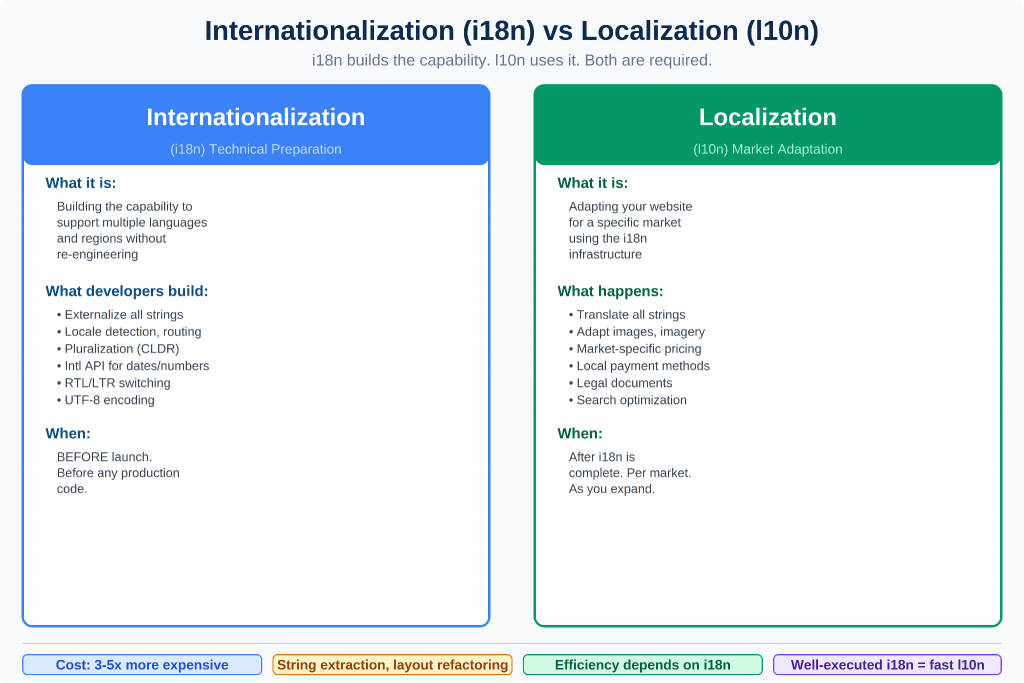
Figure 1: Internationalization builds the technical capability. Localization uses that infrastructure to adapt for a specific market.
Internationalization (i18n) is the process of designing and building your website or application so that it can support multiple languages, regions, and cultures without requiring re-engineering for each new locale.
It is technical preparation. You do it once, ideally before you write production code. It enables localization to happen efficiently.
Localization (l10n) is the process of adapting your website for a specific market — translating content, adjusting cultural elements, meeting local requirements, and optimizing for local search. It builds on top of what i18n has made possible.
| i18n = building the capability to localize. l10n = actually localizing for a specific market. |
The analogy: i18n is installing electrical wiring in a building. l10n is deciding which appliances to plug in, in which rooms, for which occupants.
3. Why i18n Must Come First
A codebase that was not built with i18n in mind is expensive to localize. The cost of retrofitting i18n is typically 3 to 5 times more than building it in from the start.
Common i18n failures that block localization:
• Hardcoded strings: Text embedded directly in HTML, JSX, or templates rather than referenced from files. Every string must be manually extracted, often thousands of strings.
• Non-flexible layouts: UI components designed around English text lengths. When German runs 30% longer or Arabic runs right-to-left, components break without refactoring.
• Date/time/number assumptions: Code that assumes US date notation (MM/DD/YYYY), US currency formatting (1,234.56), or single-byte characters. This fails silently in other locales.
• ASCII/Latin-1 assumptions: Character encoding issues in databases, file I/O, and APIs when non-Latin scripts (Arabic, Chinese, Japanese, Korean, Cyrillic) are introduced.
• Single-byte string operations: String functions operating on bytes rather than characters break with multibyte UTF-8 characters.
| Retrofitting i18n onto a production codebase typically costs 3 to 5 times more than building i18n in from the start. String extraction, layout refactoring, and database migration become major projects. |
4. Core i18n Components Developers Must Implement
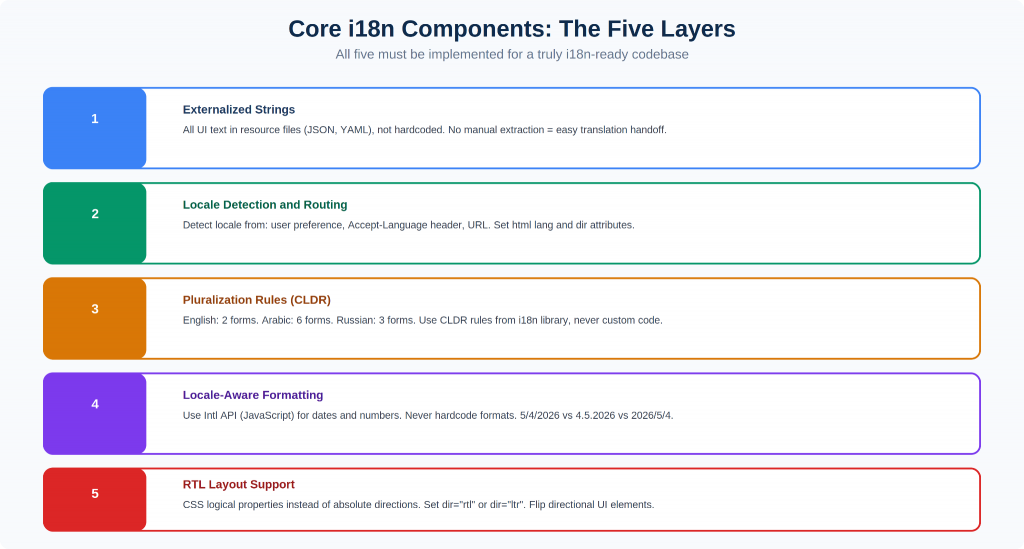
Figure 2: All five components must be implemented. A missing layer creates a critical localization gap.
1. Externalized Strings
All user-facing text must live in external resource files, not embedded in code. This is non-negotiable.
2. Locale Detection and Routing
Your application needs a clear strategy for detecting which locale each user needs and routing to the correct version.
• Priority 1: User preference (stored in cookie or profile), most reliable
• Priority 2: Accept-Language HTTP header (browser preference), reasonable fallback
• Priority 3: IP geolocation, least reliable; use only as absolute last resort
3. Pluralization (CLDR Rules)
Plural rules vary dramatically across languages. English has one rule (one/many). Arabic has six. Use your i18n library’s CLDR-based pluralization, never custom code.
4. Date, Time, and Number Formatting
Never manually format dates, times, or numbers. Use the Intl API in JavaScript or equivalent locale-aware APIs in your backend language.
5/4/2026 (US) vs 4.5.2026 (Germany) vs 2026/5/4 (Japan), all the same date, three different formats. Get this wrong and payment processing breaks, order dates confuse users, and prices look wrong.
5. RTL (Right-to-Left) Layout Support
Arabic, Hebrew, Persian, and Urdu are written right-to-left. RTL support requires more than flipping text alignment, it requires rethinking your entire layout direction.
5. The i18n to l10n Handoff
Once i18n is properly implemented, the handoff to localization is clean and cost-effective:
1. Strings are extracted from the codebase into translation resource files
2. Files are sent to a translation management system or professional translators
3. Translated files are returned and merged back into the codebase
4. Build pipeline generates locale-specific assets
5. QA validates all strings are correctly rendered in context
Tools like Lokalise, Phrase, and Crowdin integrate directly with GitHub, pulling and pushing translation files automatically as part of CI/CD. This is how you scale internationalization.
6. i18n Checklist for Developers
Before handing over to a localization team, verify this checklist:
| ☐ | All user-facing strings are externalized into locale resource files |
| ☐ | No hardcoded text in any template, component, or controller |
| ☐ | Date and time formatting uses Intl.DateTimeFormat or equivalent |
| ☐ | Number and currency formatting uses Intl.NumberFormat |
| ☐ | Pluralization is handled by the i18n library (CLDR rules) |
| ☐ | RTL layout support is implemented using CSS logical properties |
| ☐ | HTML lang attribute is dynamically set per locale |
| ☐ | HTML dir attribute switches between ltr and rtl |
| ☐ | All locale resource files follow consistent key naming |
| ☐ | Translation file format is compatible with your chosen TMS |
| ☐ | Locale detection prioritizes user preference over geolocation |
| ☐ | URL routing supports locale prefixes (/en/, /de/, /fr/) |
| ☐ | Hreflang tags are generated for all locale versions of each page |
| ☐ | Database character encoding is UTF-8 throughout |
| ☐ | File I/O and string operations are encoding-safe |
| ☐ | Images with embedded text are flagged for localization |
| ☐ | Pseudolocalization testing has been run to identify layout issues |
7. The Cost of Getting i18n Wrong
• String extraction sprint: Manually extracting thousands of hardcoded strings can take weeks of developer time
• Layout refactoring: Rebuilding components for text expansion or RTL is often more expensive than building correctly from the start
• Database migration: Migrating from Latin-1 to UTF-8 on production databases with millions of rows is a significant technical risk
• Translation rework: Content translated before the i18n layer was complete often needs redoing after strings are restructured
Investing in i18n early is always cheaper. To understand the full cost picture, see Website Localization Cost: What You Should Expect to Pay.
8. Frequently Asked Questions
What is the difference between i18n and g11n (globalization)?
Globalization (g11n) is the broadest term, the entire business and technical strategy for international expansion. Internationalization (i18n) is the technical preparation phase. Localization (l10n) is the market-specific adaptation phase. They nest inside each other.
Should i18n be handled by the front-end or back-end?
Both. Front-end i18n handles UI strings, layout direction, and client-side formatting. Back-end i18n handles database content, API responses, email templates, and server-rendered pages. Most modern applications require i18n at both layers, working together.
Can I test i18n before I have real translations?
Yes, pseudolocalization is designed for exactly this. A pseudolocalization pass replaces all translatable strings with expanded, accented versions that stress-test your layout. Most professional i18n libraries support pseudolocalization modes. It catches layout issues before real translators arrive.
What happens if my app was not built with i18n?
The entire codebase needs refactoring. All hardcoded strings must be extracted, layouts must be made flexible, date/number formatting must be rewritten for locale awareness, and character encoding must be audited. This is 3 to 5 times more expensive than building i18n from the start. Start today, not tomorrow.
Related Articles
This article is part of the website localization content cluster covering the full localization process and strategy.
| Website Localization vs. Website Translation: A Complete Comparison – What localization actually involves beyond translation |
| How to Localize a Shopify Store for International Markets – i18n setup for e-commerce platforms |
| Website Localization Testing: How to QA Your Localized Site Before Launch – Testing the output of proper i18n and l10n |