
WordPress powers over 43% of all websites on the internet. It also has one of the richest multilingual ecosystems of any CMS, which means there are many ways to do this, and several ways to do it badly.
This guide is written for developers and technical decision-makers. It covers the decisions that matter (plugin selection, URL architecture, hreflang implementation, theme i18n readiness, WooCommerce configuration, and workflow design) with enough specificity to actually implement, not just understand.
A note on scope: this guide assumes you already understand what website localization involves as a discipline and the distinction between internationalization and localization. If you’re building the technical foundation from scratch, the i18n vs. l10n article is worth reading first, it covers the concepts this guide assumes.
1. Before You Touch a Plugin: i18n Readiness Audit
Adding a multilingual plugin to a WordPress site that isn’t built for internationalization creates work, not capability. Before choosing any plugin, audit your setup against three questions:
Is your theme built for multilingual use?
Every user-visible string in a properly internationalized theme is wrapped in a WordPress i18n function. If your theme has hardcoded text in template files (button labels, navigation items, footer text baked directly into PHP) that text will not be accessible to any multilingual plugin’s string translation layer.
Check for:
• __(), _e(), esc_html__() wrapping all translatable strings in .php template files
• RTL stylesheet support (rtl.css) if you’re targeting Arabic, Hebrew, or other right-to-left languages
• No hardcoded text in Gutenberg block templates or Full Site Editing templates
Is your content structure translation-friendly?
Custom Post Types need to be registered in a way that a multilingual plugin can hook into. If you’re using Advanced Custom Fields, Elementor, or a custom page builder, verify that the plugin you’re considering has explicit compatibility documentation for that tool before committing. Retrofitting compatibility after a plugin choice is made is expensive.
• Are Custom Post Types registered with the correct ‘show_in_rest‘ and ‘rewrite‘ settings?
• Are ACF field groups accessible via the translation plugin’s API?
• Are page builder widget contents stored in post meta in a way the plugin can access?
Can your hosting handle the load?
A multilingual site can serve two to ten times the page variants of a monolingual one. Confirm that your hosting stack supports locale-based CDN caching rules, that your server resources scale appropriately with language count, and that any caching plugins you’re running (WP Rocket, W3 Total Cache, LiteSpeed) have multilingual-aware configuration modes.
| The most expensive localization mistake in WordPress is choosing a plugin first and auditing your theme and content structure second. Run the audit before you commit to any plugin. |
2. URL Structure: The Decision You Can’t Easily Undo
Your URL structure is one of the most consequential decisions in a WordPress localization project. It affects SEO signal strength, hosting architecture, maintenance complexity, and (once real traffic and backlinks exist) it’s painful to change. Make this decision deliberately, before any content is published to localized URLs.
| Structure | Example | SEO Signal | Main Trade-off | Verdict |
| Subdirectory | yoursite.com/de/ | Strong — shares domain authority | All languages on one domain | Recommended |
| Subdomain | de.yoursite.com | Moderate — partially separate | Builds authority independently | Acceptable |
| ccTLD | yoursite.de | Strongest local trust | Expensive; separate authority per domain | Enterprise only |
For the large majority of WordPress projects, subdirectories are the right choice. They share your primary domain’s authority across all language versions, require the least infrastructure overhead, and are natively supported by every multilingual plugin without additional DNS configuration.
The ccTLD approach — separate domains like yoursite.de and yoursite.fr — produces the strongest trust signal for users in those specific markets, particularly in countries like Germany where a .de domain carries meaningful credibility. But each domain builds its SEO authority independently, which means you’re effectively starting from zero in each market. Unless you have the resources to run sustained link-building campaigns per domain, subdirectories will compound authority faster.
3. Choosing a Multilingual Plugin
There are four plugins that account for the overwhelming majority of WordPress multilingual implementations. Each makes different trade-offs. The flowchart below maps the decision; the sections after it explain each option in enough depth to evaluate properly.
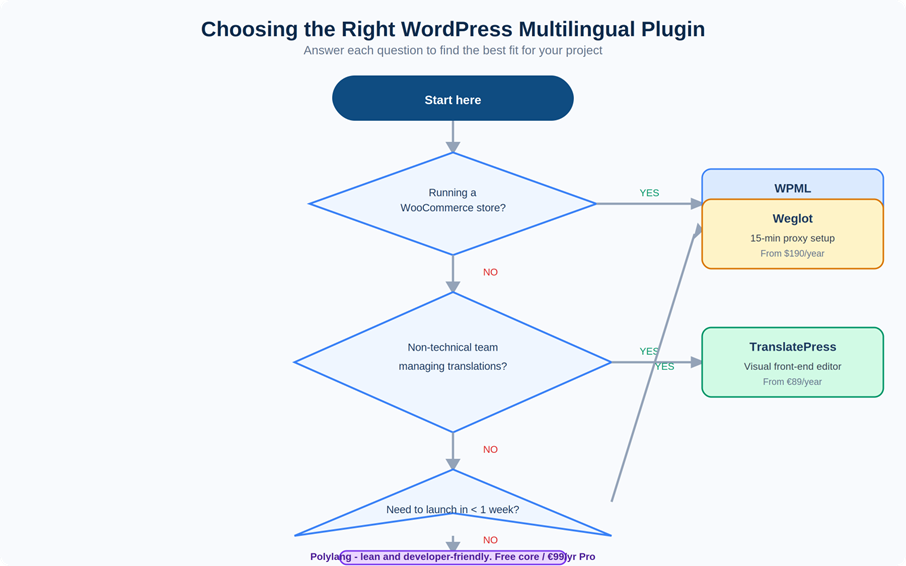
Figure 1: Plugin decision flowchart. Start at the top and answer each question to identify the best fit for your project.
| Plugin | Best For | Price | Key Characteristic |
| WPML | WooCommerce, CPTs, enterprise | From $99/yr | Most battle-tested; broadest compatibility |
| Polylang | Developer-led, budget-conscious teams | Free / €99/yr Pro | Lean, clean codebase; fewer abstraction layers |
| TranslatePress | Non-technical translators | From €89/yr | Visual front-end editing; no backend navigation |
| Weglot | Speed-to-market, minimal dev overhead | From $190/yr | Proxy-based; fastest setup, least control |
WPML
WPML is the most widely deployed multilingual plugin and the one with the deepest compatibility ecosystem. For complex setups (WooCommerce stores, sites with many Custom Post Types, or projects where the translation workflow needs to connect to an external translation management system) it’s the most reliable starting point.
Key developer integration points:
| // Get translation of a specific post in a target language |
| $translated_post_id = apply_filters( |
| ‘wpml_object_id’, $post_id, ‘post’, true, ‘de’ |
| ); |
| // Output the language switcher via PHP action |
| do_action( ‘wpml_add_language_selector’ ); |
Known limitation: WPML’s architecture creates a strict translation relationship between posts. This is powerful when your workflow is disciplined, but if your content team regularly deletes and recreates pages rather than updating existing ones, orphaned translation relationships accumulate and cause maintenance overhead. Establish content governance rules before go-live.
Polylang
Polylang is leaner than WPML and tends to be preferred by developers who want more direct access to the translation layer without the abstraction overhead. The free version covers most basic multilingual needs; Polylang Pro adds Custom Post Types, WooCommerce, and ACF support.
| // Get the current active language |
| $current_lang = pll_current_language(); |
| // Get the translated version of a post by ID |
| $translated_id = pll_get_post( $post_id, ‘de’ ); |
Polylang’s free tier is genuinely capable for static or blog-style sites, which makes it a sensible first choice for teams who want to validate the value of multilingual before committing to an annual plugin spend.
TranslatePress
TranslatePress solves a specific problem: translators who are not WordPress developers find the backend string-hunting workflow disorienting. TranslatePress replaces that with a front-end visual editor where you see the page as it appears to users and click on any element to translate it directly.
It also supports automatic first-pass translation via DeepL or Google Translate, with human review layered on top. For teams using a machine-translation-first workflow, the visual editor makes the post-editing process considerably faster than reviewing strings in a backend table.
Weglot
Weglot is architecturally different from the other three: it operates as a proxy layer that intercepts your site’s output and serves translated versions dynamically, without modifying your WordPress database. Setup time is genuinely 15–30 minutes for a basic translated site.
The trade-off is control. Because Weglot manages strings on its own infrastructure rather than inside WordPress, integrating with bespoke development (custom post types with unusual storage patterns, headless setups, heavily filtered content) can produce inconsistent results. Pricing also scales aggressively with traffic and word count, which makes it expensive at volume.
When Weglot makes sense: proof-of-concept localization before committing to a full implementation, or small sites where development time is the scarce resource rather than translation budget.
4. Hreflang: What It Does and How to Get It Right
Hreflang tells search engines which version of a page to serve to users in which language and region. Without it, Google has to guess, and it frequently guesses wrong, serving English content to German users or French content to Canadian ones. Correct hreflang implementation is the most important single technical task in a multilingual WordPress project from an SEO standpoint.
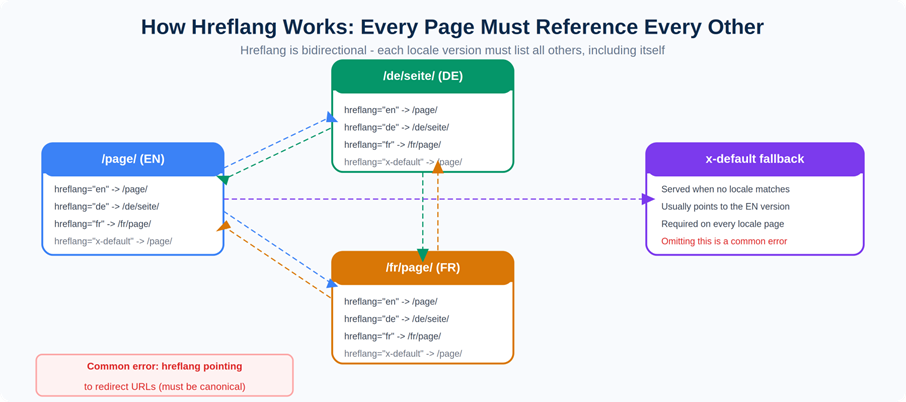
Figure 2: Hreflang is bidirectional. Every page must reference all other locale versions, including itself. Missing any direction creates orphaned signals that Google ignores.
Diagram titled “How Hreflang Works,” explaining bidirectional linking between English, German, and French pages and the x-default fallback to effectively localize a WordPress website.
The Correct Structure
| <!– Every locale version of the page must include ALL of these –> |
| <link rel=”alternate” hreflang=”en” href=”https://yoursite.com/page/” /> |
| <link rel=”alternate” hreflang=”de-DE” href=”https://yoursite.com/de/seite/” /> |
| <link rel=”alternate” hreflang=”fr-FR” href=”https://yoursite.com/fr/page/” /> |
| <link rel=”alternate” hreflang=”x-default” href=”https://yoursite.com/page/” /> |
The x-default tag is required on every page in every locale. It tells Google which version to serve when no locale match exists, typically your primary language version. Omitting it doesn’t break the implementation, but it creates ambiguity that search engines resolve inconsistently.
Use correct BCP 47 language tags throughout: en-GB not en; de-DE not de; zh-Hans not zh. The distinction matters for markets where the same language is used differently across countries, Brazilian and European Portuguese, Simplified and Traditional Chinese, Latin American and Castilian Spanish.
Hreflang via Plugin
WPML and Polylang both generate hreflang automatically for all translated content. Verify the output after setup:
• In WPML: Settings → Languages → Language URL Format
• In Polylang: Settings → Languages → URL modifications
• In both: run Screaming Frog after launch to crawl the full hreflang graph and confirm there are no broken references, self-references missing, or redirect-target URLs
Hreflang Manually (Headless WordPress)
| // Add hreflang to wp_head using Polylang |
| function add_hreflang_tags() { |
| $languages = pll_the_languages( array( ‘raw’ => 1 ) ); |
| foreach ( $languages as $lang ) { |
| echo ‘<link rel=”alternate” hreflang=”‘ . esc_attr( $lang[‘locale’] ) . ‘” |
| href=”‘ . esc_url( $lang[‘url’] ) . ‘” />’ . “\n”; |
| } |
| } |
| add_action( ‘wp_head’, ‘add_hreflang_tags’ ); |
The Four Most Common Hreflang Errors
• URLs that return a redirect. Every hreflang URL must be the canonical URL for that page, the URL that resolves with a 200 status, not one that 301s somewhere else. Redirected hreflang URLs are ignored by Google.
• Pages not self-referencing. Every page must include its own locale in its hreflang set. A German page that references English and French but not itself is malformed.
• Missing x-default. Required on every page. Commonly skipped on inner pages even when it’s correctly set on the homepage.
• Wrong locale codes. Using en instead of en-GB or en-US creates ambiguity. Use four-character locale codes wherever regional differentiation exists.
5. Theme and Block Editor Considerations
Classic PHP Themes
For classic themes, every user-visible string must be wrapped in a WordPress i18n function. Any string that isn’t wrapped is invisible to the translation layer:
| // The three functions you need to know |
| echo __( ‘Welcome to our website’, ‘your-text-domain’ ); // Returns translated string |
| _e( ‘Read more’, ‘your-text-domain’ ); // Echoes translated string |
| echo esc_html__( ‘Your cart is empty’, ‘your-text-domain’ ); // Escaped + translated |
Themes acquired from ThemeForest or commercial marketplaces frequently have partial i18n coverage, some strings wrapped, others not. Run a grep for hardcoded strings before choosing a theme for a multilingual project: grep -r ‘”[A-Z]’ ./template-parts/ will surface most of them.
Block Editor (Gutenberg) and Full Site Editing
Block content is stored differently from classic theme template strings, which creates additional complexity for the translation layer. Block-level text lives in post content as serialized HTML comment markup rather than in PHP template strings, and plugins access it differently.
• WPML’s Translation Editor and TranslatePress’s front-end editor both handle block-level content translation, but verify this for any custom or third-party blocks you’re using
• Reusable blocks shared across locales are a common trap: if a reusable block is edited in one language, the change propagates to all. Create language-specific reusable blocks or avoid them entirely for translatable content
• Full Site Editing (FSE) theme compatibility with multilingual plugins is still maturing as of 2026. Test thoroughly on your specific theme before relying on any plugin’s FSE support in production
Page Builders
Elementor, Divi, and WPBakery are all supported by WPML and most major plugins, but each requires a specific compatibility module to expose widget content to the translation layer. Without the module, content inside builder widgets falls outside the translation scope entirely, it renders in the source language regardless of what locale is active.
Install and verify the compatibility module before beginning any translation work. Test by creating a draft translation and confirming that all widget-level strings appear in the translation editor, not just the post-level copy.
6. WooCommerce Localization
WooCommerce localization is a superset of standard WordPress multilingual setup. Everything in the previous sections applies, plus a layer of e-commerce-specific configuration that’s easy to underestimate.
Product Content
WPML for WooCommerce and Polylang for WooCommerce both handle product translation, including product names, descriptions, short descriptions, attributes, variations, and product categories. Install the WooCommerce-specific extension of your chosen plugin, the base multilingual plugin alone does not cover all WooCommerce content types.
Pricing and Currency
There’s a critical distinction between currency display switching and market-specific pricing. Currency display switching converts a single price into different currencies at the current exchange rate. Market-specific pricing sets distinct prices per market (€89 in Germany, £79 in the UK, $99 in the US) independent of exchange rates.
WPML Multilingual + WooCommerce supports market-specific pricing per currency. For markets where pricing psychology, VAT inclusion, or competitive positioning require different price points, currency display switching alone is not sufficient.
| In EU markets, prices displayed to consumers must include VAT. A product priced at £100 ex-VAT in the UK cannot simply show €115 to German users, it needs to show €119 (or whatever the VAT-inclusive amount is). This is a legal requirement, not a formatting preference. |
Payment Methods per Locale
WooCommerce payment gateway plugins typically support conditional display by locale. Configure iDEAL to appear only for Dutch users, SEPA Direct Debit for German and wider EU users, Boleto for Brazilian users. Users landing on an international checkout and not seeing their expected payment method will abandon at a rate that materially affects revenue, this is not a nice-to-have configuration.
Use Mollie for comprehensive European payment method coverage, or Stripe with its Payment Element for a broad global set. Both have WooCommerce plugins with locale-aware display logic.
Transactional Emails
WPML handles WooCommerce transactional email translation automatically when configured correctly. Verify that order confirmation, shipping notification, and refund emails all trigger in the customer’s language, not the site’s default language. Test by placing a test order with a user account set to each active language before launch.
7. Building a Translation Workflow That Scales
The plugin setup is the foundation. The workflow is what determines whether your localized content stays current as the site evolves, which is where most WordPress localization implementations gradually fail.
The Recommended Workflow Structure
1. Content is created and published in the source language (typically English)
2. The multilingual plugin flags the post as “needs translation”
3. Translators access the job via the plugin’s editor, or via a connected translation management system (WPML integrates with Lokalise, Phrase, Crowdin, and others)
4. A second native-speaker reviewer checks the translated content
5. Approved content is published and hreflang updates automatically
The failure pattern to avoid: manually copy-pasting content between Google Docs, email threads, and WordPress. This breaks translation memory accumulation, makes QA impossible to systematise, and doesn’t scale past two or three languages. If your team is doing this, connecting to a TMS is the highest-leverage technical change you can make to the localization program.
Translation Memory
Translation memory (TM) stores previously translated segment pairs. When new content contains phrases that match previously translated segments, the TMS surfaces those matches and (depending on match quality) reduces or eliminates the cost of retranslating them. A well-maintained TM from year one can reduce translation costs by 30–50% by year three for a site with significant content overlap across updates.
This compounding cost reduction is one of the strongest arguments for integrating a TMS early rather than managing translations purely through the WordPress plugin interface, which doesn’t build or leverage translation memory.
8. Performance Considerations for Multilingual WordPress
Multilingual sites serve significantly more page variants than monolingual ones. Without explicit configuration, this can degrade performance in ways that affect both user experience and Core Web Vitals scores.
• Locale-aware CDN caching. Cloudflare and AWS CloudFront both support cache rules based on the locale cookie or URL path. Without locale-aware caching, users may be served cached content from a different language version. Configure cache rules per language path before launch.
• Avoid CSS-based language switching. Some proxy-based localization tools serve all language versions in the DOM and toggle visibility with CSS. This inflates page size by a factor equal to your language count, a five-language site could be loading five times the content on every page load. Verify your chosen approach serves only the active locale’s content.
• Image CDN configuration. If localized pages use market-specific images (different photography for different cultures, text-embedded images in different languages) serve these from locale-aware CDN paths rather than duplicating assets with identical filenames.
• Monitor per locale in Google Search Console. GSC shows Core Web Vitals segmented by URL prefix, which maps to your locale paths. A performance regression in the German version that’s invisible in aggregate can be caught quickly if you’re monitoring /de/ separately from your primary domain.
9. Frequently Asked Questions
Should I use WordPress Multisite for localization?
Multisite allows each language to run as a distinct WordPress installation under one codebase, which gives maximum separation and independent content governance. The cost is maintenance complexity: plugin updates, content synchronisation, and user management all become multi-site operations. For most projects, a single WordPress installation with a multilingual plugin is the right choice. Multisite makes sense when different language versions have genuinely different editorial teams, different themes, or different plugin configurations.
Can I use Elementor and WPML together?
Yes, with the WPML Elementor Multilingual compatibility plugin installed alongside WPML. Without it, Elementor widget content is outside WPML’s translation scope. The same principle applies to most major page builders: the base WPML plugin handles WordPress core content; a compatibility module is required for builder-specific content.
How do I handle SEO metadata for multilingual WordPress?
Use a SEO plugin with explicit multilingual support: Yoast SEO integrates cleanly with WPML; Rank Math works well with Polylang. These plugins generate locale-specific meta titles, descriptions, and XML sitemaps, and expose the fields you need to write market-specific metadata rather than translated English metadata. Translated metadata is not the same as localized metadata, each locale’s SEO fields should be written for local search intent and keyword research in that language, not adapted from the English version.
What’s the best way to QA a WordPress multilingual setup before launch?
A structured pre-launch QA process covers linguistic accuracy, functional testing (forms, checkout, payment methods, redirects), visual testing (text expansion, RTL layout, font rendering), and SEO verification (hreflang, sitemaps, canonical tags). The full pre-launch localization QA checklist covers all four testing types with specific items for each, including a sign-off matrix you can use before pushing to production.
How do I connect WordPress to a professional translation workflow?
WPML has native integrations with Lokalise, Phrase, Crowdin, and several other TMS platforms via its Translation Management module. Polylang has fewer native integrations but supports XLIFF export/import, which most TMS tools accept. The integration typically works by pulling translatable strings from WordPress into the TMS, routing them through your translation workflow (human, MTPE, or automated), and pushing approved translations back automatically. This is significantly more scalable than managing translations through the WordPress admin interface directly.
Related Articles
This article is part of the website localization content cluster. The linked articles are referenced throughout this piece.
| What Is Website Localization? Definition, Examples, and Why It Matters — The non-technical foundation this guide builds on |
| How to Localize a Shopify Store for International Markets — The equivalent platform guide for Shopify-based businesses |
| Website Localization Cost: What You Should Expect to Pay — Translation costs, TMS subscriptions, and plugin pricing in context |